
Time Tracking for Teams
Time tracking in Taskee records how long work actually takes, task by task, without asking anyone to keep a separate timesheet. A timer lives on every task, so a person starts it from wherever they already are — the task list, the Kanban board, the task page, or the pop-up timer in the header. Time that was never tracked live can be added by hand afterwards, so a forgotten timer does not turn into a hole in the month. Everything the timer collects flows straight into Reports, where it can be filtered by project, period, person and task status. The result is one number per task, per person and per project that came from the work itself rather than from someone’s memory at the end of the week. This page shows how tracking works in the interface, who tends to need it, and how it differs from the reporting and project tools around it.
What time tracking in Taskee is for Link copied!
Most teams do not lose hours in one dramatic place. They lose them in small, unrecorded pieces: a task that quietly took three days instead of one, a person who spent half a week helping on someone else’s project, a client project that felt profitable until the invoice was written. Time tracking exists to make those pieces visible while the work is still happening.
Taskee attaches the timer to the task rather than to the day. Because the unit is a task, tracked time carries the task’s project, assignee, status and tags with it, and every report downstream can be sliced along any of them. Nobody has to reconstruct at the end of the week what a block of hours was actually for.
Two practical properties matter more than the timer itself. Tracking has to be reachable in one click from wherever the person already is, or it will not be used — so Taskee puts a start control on the task list, the board, the task page and the header. And tracking has to survive human error, so time can be entered manually after the fact, and a timer left running by a colleague can be stopped by someone with the right permissions instead of inflating the numbers all night.
Tracking time Link copied!
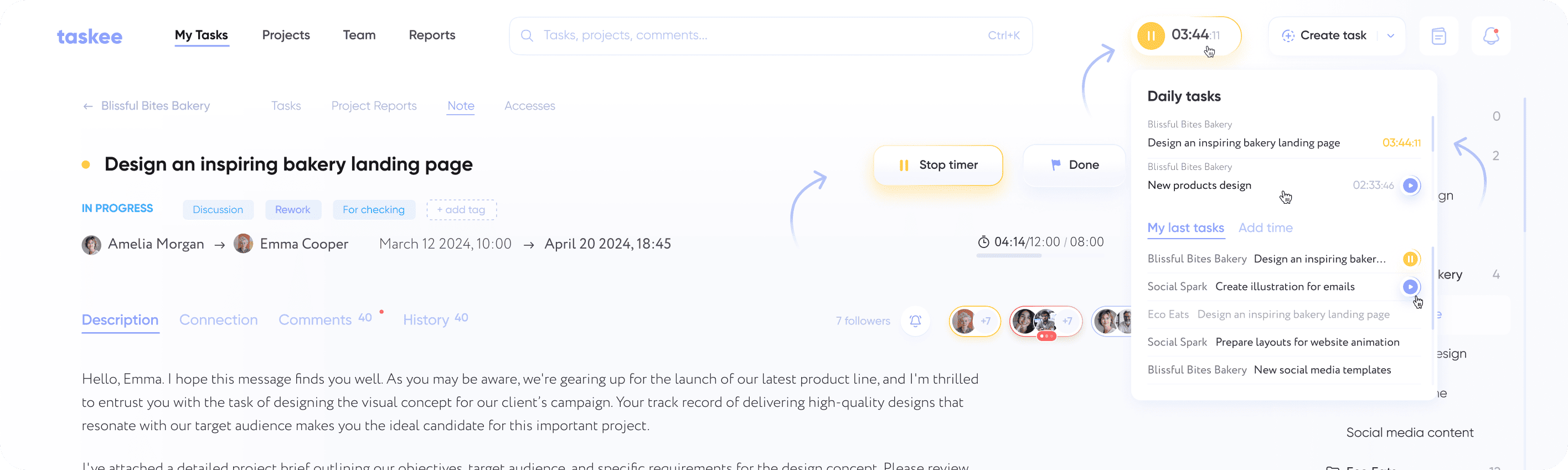
There are several ways to track task time. Mouse over the task on the task list or Kanban to see the Play button. On the task page click on Start Timer. Click on the timer button in the Taskee heading to automatically run the last active task. Start the recent task via the pop-up timer in the Taskee heading: choose a recent task from the list, mouse over it and hit Play.
The reason there are four entry points rather than one is that people start work from different places. A developer opens the task page and reads the description first. A designer moves a card on the board and starts working immediately. Someone returning from a meeting usually wants the thing they were doing an hour ago, which is why the header button restarts the last active task without making them search for it. Each of these starts the same timer against the same task, so the choice of entry point never changes what ends up in the report.
Following tasks real-time Link copied!
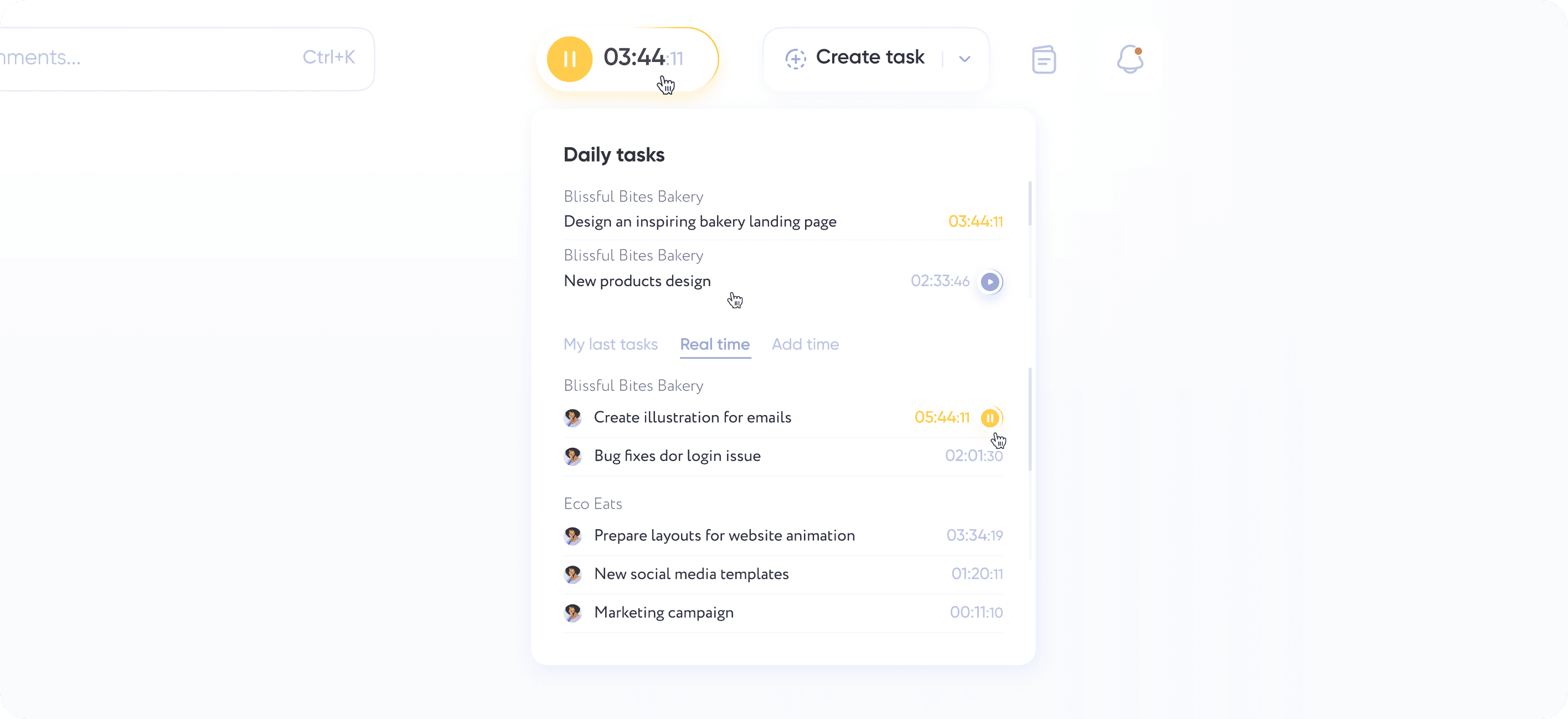
You can use the pop-up timer to see the tasks that your colleagues are working on now. You can stop the timer if somebody forgot to do it, if you have the rights required.
This view answers a question that otherwise costs a message and a wait: what is the team on right now. For a lead deciding who to hand an urgent task to, seeing that two people are mid-task and one is not is faster than asking. It is also the correction mechanism for the most common tracking error there is — a timer left running overnight. Because stopping someone else’s timer is tied to permissions, that correction stays with the people who are accountable for the numbers rather than being open to everyone.
Adding time manually Link copied!
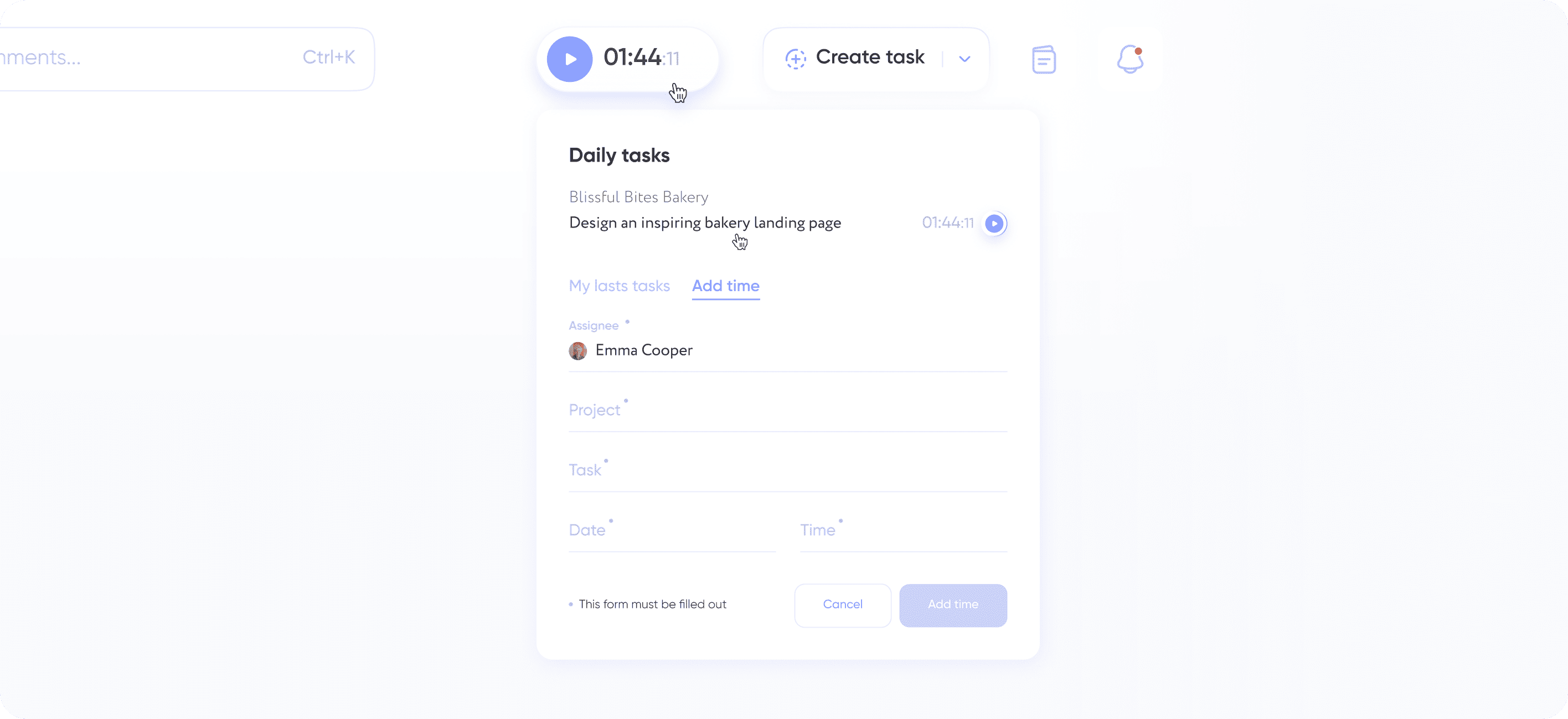
In the pop-up timer, the Add Time tab, you can add time manually to the task. And if you have the rights required, you can add time to your colleague’s task.
Manual entry is what keeps tracked time honest rather than merely automatic. Work happens on phone calls, in workshops, on a whiteboard and away from the keyboard, and none of that will ever be caught by a running timer. Letting an authorised person add time to a colleague’s task also covers the case where someone is out — a project can be closed with a complete picture instead of waiting for one person to come back and fill in their own gaps.
Who tracks time in Taskee Link copied!
Time tracking earns its place fastest where hours are the unit the business is measured in.
Client service teams bill against hours, so the gap between tracked and untracked work is revenue. Tracking per task means an invoice can be traced back to specific pieces of work rather than to a round number. This is the core case on the pages for agencies, creative agencies and consulting teams.
Freelancers and small teams need proof of effort more than they need supervision. A single person tracking their own tasks gets an evidence trail for a client conversation about scope — see freelancers and small and medium business.
Distributed teams cannot read effort off the room, because there is no room. Tracked time on tasks replaces presence as the signal, which is a healthier measure than hours online — see remote teams.
Delivery and product teams use tracked time as an estimation input: last quarter’s actual hours against similar tasks are a better forecast than a fresh guess. See product development and IT teams.
Time tracking, reports and task management Link copied!
These three are frequently confused, so it is worth naming the boundary.
Time tracking is capture. It records how long a specific task took and attaches that duration to the task, the person and the project. It answers “how long did this take”.
Reports are aggregation. They take everything the timer captured, plus everything added by hand, and roll it up by project, person, period and readiness. Reports answer “where did the month go” — a question a timer alone cannot answer.
Task management is the container. It defines the task that time is tracked against: its assignee, deadline, status, tags and priority. Without a task there is nothing for the timer to attach to, which is why tracked time in Taskee is always tied to a specific piece of work rather than to a generic activity category.
In short: tasks define the work, the timer measures it, reports explain it. Most teams turn all three on together, but a team that only wants to know where its hours go can start with the timer and add the rest later.
Start tracking on your own tasks — create a company in Taskee. Time tracking is not a paid add-on — see pricing.


